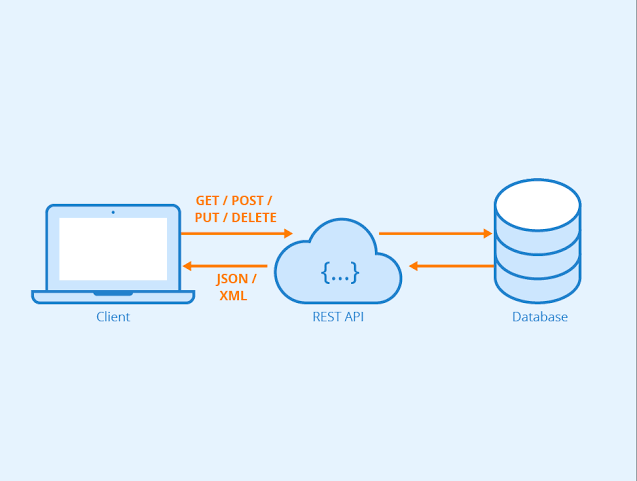
In today's interconnected digital world, RESTful APIs have become the backbone of modern web services. When it comes to SMS functionality, a RESTful SMS API provides a standardized, efficient way to send and receive text messages programmatically. This comprehensive guide will walk you through everything you need to know about RESTful SMS APIs and how to integrate them into your applications.
[!INFO] Did you know? RESTful APIs power over 83% of public APIs, making them the industry standard for web service integration.
What is a RESTful SMS API?
A RESTful SMS API is an application programming interface that follows REST (Representational State Transfer) principles to enable SMS functionality. It allows developers to send, receive, and manage text messages through simple HTTP requests, making SMS integration seamless with web and mobile applications.
Key Characteristics of RESTful SMS APIs:
- Stateless: Each request contains all necessary information
- Resource-Based: SMS messages are treated as resources with unique URLs
- HTTP Methods: Uses standard GET, POST, PUT, DELETE operations
- JSON/XML Format: Data exchange in lightweight formats
Core Components of a RESTful SMS API
1. Endpoints
RESTful SMS APIs typically provide endpoints for different operations:
- POST /sms/send - Send a new SMS message
- GET /sms/status/{id} - Check message delivery status
- GET /sms/reports - Retrieve delivery reports
- DELETE /sms/{id} - Cancel a pending message (if supported)
2. Authentication
Secure authentication is crucial for SMS APIs:
// Bearer Token Authentication Authorization: Bearer your_api_key_here// API Key in Header X-API-Key: your_api_key_here
// Basic Authentication Authorization: Basic base64_encoded_credentials
3. Request/Response Formats
Most modern SMS APIs use JSON for data exchange:
Request Example:
{
"recipient": "31612345678",
"sender_id": "YourName",
"type": "plain",
"message": "This is a test message"
}
Response Example:
{
"success": true,
"message_id": "sms_123456789",
"status": "sent",
"cost": 0.015
}
How RESTful SMS APIs Work
The Request-Response Cycle
- Client Request: Your application sends an HTTP request to the SMS API endpoint
- Authentication Check: The API validates your credentials
- Message Processing: The API processes your SMS request
- Carrier Delivery: Message is sent to the recipient's mobile carrier
- Response: API returns delivery status and message ID
HTTP Status Codes in SMS APIs
- 200 OK - Request successful
- 201 Created - SMS message created and queued
- 400 Bad Request - Invalid parameters
- 401 Unauthorized - Authentication failed
- 403 Forbidden - Insufficient permissions
- 429 Too Many Requests - Rate limit exceeded
Integrating RESTful SMS API: Step-by-Step
Step 1: Choose the Right SMS Provider
Consider these factors when selecting an SMS API provider:
- Global Coverage: Support for international numbers
- Delivery Rates: High delivery success rates
- Pricing: Transparent, competitive rates
- Documentation: Comprehensive API docs and examples
- Support: Reliable customer support
Step 2: Obtain API Credentials
Sign up with your chosen provider and get your API key:
# Example: Getting API key from TxtMsg.lk
curl -X POST https://sms.txtmsg.lk/api/v3/auth/login

-H "Content-Type: application/json"

-d '{"email":"your@email.com","password":"yourpassword"}'
Step 3: Make Your First API Call
Here's a basic example using cURL:
curl -X 'POST'

'https://sms.txtmsg.lk/api/v3/sms/send'

-H 'accept: application/json'

-H 'Authorization: Bearer YOUR_API_KEY'

-H 'Content-Type: application/json'

-d '{
"recipient": "31612345678",
"sender_id": "YourName",
"type": "plain",
"message": "This is a test message"
}'
Step 4: Handle Responses and Errors
Always implement proper error handling:
// JavaScript example with fetch
async function sendSMS(phoneNumber, message) {
try {
const response = await fetch('https://sms.txtmsg.lk/api/v3/sms/send', {
method: 'POST',
headers: {
accept: 'application/json',
Authorization: 'Bearer YOUR_API_KEY',
'Content-Type': 'application/json',
},
body: JSON.stringify({
recipient: phoneNumber,
sender_id: 'YourName',
type: 'plain',
message: message,
}),
});
const data = await response.json();

if (response.ok && data.success) {
  console.log('SMS sent successfully:', data);
  return { success: true, data: data };
} else {
  console.error('SMS failed:', data.message);
  return { success: false, error: data.message };
}

} catch (error) {
console.error('Network error:', error);
return { success: false, error: error.message };
}
}
Best Practices for RESTful SMS API Integration
1. Rate Limiting and Throttling
Implement rate limiting to avoid overwhelming the API:
// Example: Simple rate limiter
class RateLimiter {
constructor(requestsPerMinute = 60) {
this.requests = [];
this.limit = requestsPerMinute;
}
canMakeRequest() {
const now = Date.now();
this.requests = this.requests.filter(time => now - time < 60000);
return this.requests.length < this.limit;
}
recordRequest() {
this.requests.push(Date.now());
}
}
2. Input Validation
Always validate inputs before sending to the API:
function validateSMSRequest(phoneNumber, message) {
const errors = [];
// Phone number validation
if (!/^+947[0-9]{8}$/.test(phoneNumber)) {
errors.push('Invalid Sri Lankan phone number format');
}
// Message length validation
if (message.length > 160) {
errors.push('Message too long (max 160 characters)');
}
if (message.length === 0) {
errors.push('Message cannot be empty');
}
return {
isValid: errors.length === 0,
errors: errors,
};
}
3. Secure API Key Management
Never expose API keys in client-side code:
// Server-side example (PHP)
<?php
class SMSService {
private $apiKey;
private $baseUrl = 'https://sms.txtmsg.lk/api/v3/sms/send';
public function __construct() {
// Load from environment variable
$this->apiKey = getenv('SMS_API_KEY');
if (!$this->apiKey) {
throw new Exception('SMS API key not configured');
}
}
public function sendSMS($recipient, $message) {
$data = [
'recipient' => $recipient,
'sender_id' => 'YourName',
'type' => 'plain',
'message' => $message
];
$ch = curl_init($this->baseUrl);
curl_setopt($ch, CURLOPT_RETURNTRANSFER, true);
curl_setopt($ch, CURLOPT_POST, true);
curl_setopt($ch, CURLOPT_POSTFIELDS, json_encode($data));
curl_setopt($ch, CURLOPT_HTTPHEADER, [
'accept: application/json',
'Authorization: Bearer ' . $this->apiKey,
'Content-Type: application/json'
]);
$response = curl_exec($ch);
curl_close($ch);
return json_decode($response, true);
}
}
?>
4. Monitoring and Logging
Implement comprehensive logging for debugging and monitoring:
// Example: SMS logging utility
class SMSLogger {
log(level, message, data = null) {
const timestamp = new Date().toISOString();
const logEntry = {
timestamp,
level,
message,
data,
};
// In production, send to logging service
console.log(JSON.stringify(logEntry));

// Store in database or send to monitoring service

}
logSentSMS(messageId, recipient) {
this.log('INFO', 'SMS sent successfully', { messageId, recipient });
}
logFailedSMS(error, recipient) {
this.log('ERROR', 'SMS sending failed', { error, recipient });
}
}
Common RESTful SMS API Use Cases
1. Two-Factor Authentication (2FA)
async function sendOTP(phoneNumber, otp) {
const message = Your verification code is: ${otp}. Valid for 5 minutes.;
return await sendSMS(phoneNumber, message);
}
2. Order Notifications
async function sendOrderConfirmation(orderId, customerPhone) {
const message = Thank you! Your order #${orderId} has been confirmed. Track at: https://yourstore.com/track/${orderId};
return await sendSMS(customerPhone, message);
}
3. Marketing Campaigns
async function sendBulkSMS(recipients, message) {
const results = [];
for (const recipient of recipients) {
// Add delay to respect rate limits
await new Promise(resolve => setTimeout(resolve, 1000));
const result = await sendSMS(recipient, message);
results.push({ recipient, ...result });

}
return results;
}
4. Alert Systems
async function sendAlert(phoneNumber, alertType, details) {
const messages = {
server_down: '🚨 ALERT: Server is down. Check immediately!',
payment_failed: ⚠️ Payment failed for order ${details.orderId},
security_breach: '🔒 SECURITY ALERT: Unusual activity detected',
};
const message = messages[alertType] || 'System Alert';
return await sendSMS(phoneNumber, message);
}
Challenges and Solutions
1. Message Delivery Issues
Challenge: Messages sometimes fail to deliver Solution: Implement retry logic and delivery tracking
async function sendSMSWithRetry(phoneNumber, message, maxRetries = 3) {
for (let attempt = 1; attempt <= maxRetries; attempt++) {
try {
const result = await sendSMS(phoneNumber, message);
if (result.success) {
return result;
}
// Wait before retry (exponential backoff)
if (attempt < maxRetries) {
await new Promise(resolve =>
setTimeout(resolve, Math.pow(2, attempt) * 1000)
);
}
} catch (error) {
if (attempt === maxRetries) {
throw error;
}
}
}
}
2. Rate Limiting
Challenge: API providers limit request frequency Solution: Implement queuing and batching
3. International Number Handling
Challenge: Different country codes and formats Solution: Use a phone number validation library
Testing Your RESTful SMS Integration
Unit Testing
// Example: Testing SMS sending logic
describe('SMS Service', () => {
test('should send SMS successfully', async () => {
// Mock the API response
const mockResponse = {
status: 'success',
data: { message_id: 'sms_123' },
};
// Test the function
const result = await sendSMS('+94712345678', 'Test message');

expect(result.success).toBe(true);
expect(result.data.message_id).toBe('sms_123');

});
});
Integration Testing
Use services like Postman or Insomnia to test API endpoints:
{
"info": {
"name": "SMS API Tests",
"schema": "https://schema.getpostman.com/json/collection/v2.1.0/collection.json"
},
"item": [
{
"name": "Send SMS",
"request": {
"method": "POST",
"header": [
{
"key": "Authorization",
"value": "Bearer YOUR_API_KEY"
}
],
"body": {
"mode": "raw",
"raw": "{"recipient":"31612345678","sender_id":"YourName","type":"plain","message":"This is a test message"}"
},
"url": {
"raw": "https://sms.txtmsg.lk/api/v3/sms/send",
"protocol": "https",
"host": ["sms", "txtmsg", "lk"],
"path": ["api", "v3", "sms", "send"]
}
}
}
]
}
Future of RESTful SMS APIs
As SMS technology evolves, RESTful APIs are incorporating new features:
- Rich Media Support: MMS capabilities through REST endpoints
- Two-Way SMS: Receiving replies via webhooks
- Advanced Analytics: Real-time delivery insights
- AI Integration: Smart message optimization
- Blockchain Security: Enhanced message authentication
Choosing the Right RESTful SMS API Provider
When evaluating SMS API providers, consider:
FeatureTxtMsg.lkCompetitor ACompetitor BRESTful API | ✅ | ✅ | ✅
Sri Lanka Focus | ✅ | ❌ | ❌
Developer Docs | ✅ | ✅ | ✅
Webhook Support | ✅ | ✅ | ❌
Bulk Sending | ✅ | ✅ | ✅
Real-time Reports | ✅ | ❌ | ✅
[!TIP] Pro Tip: Always test multiple providers with your specific use case before committing to one.
Conclusion
RESTful SMS APIs have revolutionized how applications integrate messaging functionality. By following REST principles, these APIs provide a standardized, reliable way to send SMS messages programmatically. Whether you're building authentication systems, notification services, or marketing campaigns, a well-integrated RESTful SMS API can significantly enhance your application's capabilities.
Remember to prioritize security, implement proper error handling, and monitor your API usage for optimal performance. With the right approach, RESTful SMS APIs can become a powerful tool in your development arsenal.
[!CTA] Ready to integrate SMS into your application? Try TxtMsg.lk's RESTful SMS API today. Get started with our comprehensive documentation and developer-friendly tools.